

In this article
- Problem: why old A/R matters and how to reduce accounts receivable in medical billing
- Evidence to inspect
- Reports to pull
- Facts to capture for each claim
- Likely causes
- The claim never reached the payer, or was rejected and not fixed
- The claim was submitted but no response was received
- The claim was denied and the denial was not worked
- Authorization or eligibility gaps
- Underpayment or partial payment
- Provider enrollment or credentialing problems
- Coordination of benefits errors
- Posting errors and unapplied payments
- Patient balances
- Investigation steps
- Worked example (hypothetical)
- Corrective action
- Submission and follow-up
- Prevention
- Measurement
- What cannot be promised
- Who does what: Mednex and the practice
- Next steps
Problem: why old A/R matters and how to reduce accounts receivable in medical billing
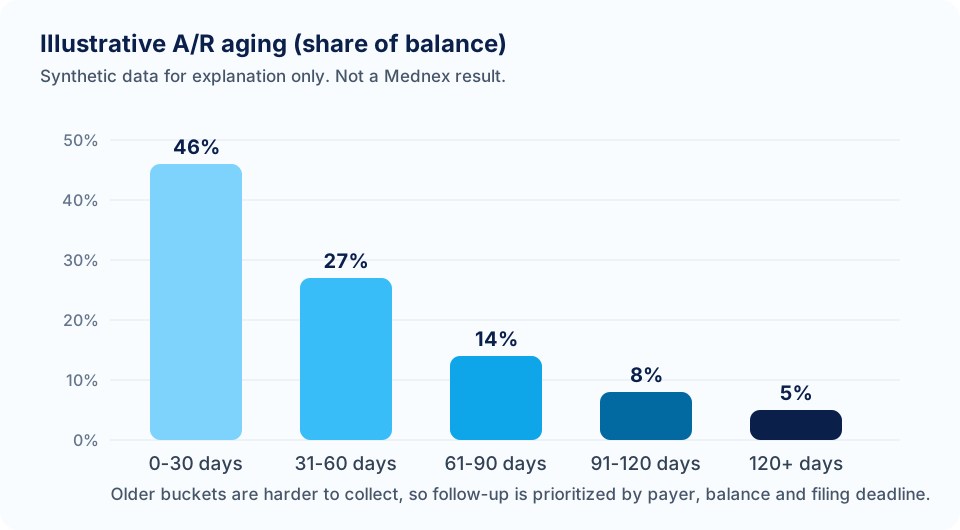
Accounts receivable (A/R) is money owed to the practice for services already delivered. It includes amounts owed by insurance payers and amounts owed by patients. Most practices track A/R in age buckets, such as 0 to 30 days, 31 to 60, 61 to 90, and over 90 days, counted from the date of service or the claim date. Check which date your report uses, because the two give different pictures.
The over 90 bucket gets attention for practical reasons:
- Collectability falls with age. Older claims are more likely to be near or past a payer’s filing or appeal deadline, and records become harder to retrieve.
- It signals process failure. A healthy workflow produces payment or a clear denial within the payer’s normal processing time. A claim open for three months or more usually means someone did not act, or a payer is holding it for a reason nobody has identified.
- It hides in the average. A single “days in A/R” number can look acceptable while a pocket of one payer or one claim type sits untouched.
- It affects planning. Cash you expect but do not receive affects payroll, purchasing, and borrowing decisions.
There is no universal acceptable share of A/R over 90 days. It depends on specialty, payer mix, and how your report is built, so compare against your own history by payer, not against a generic figure. The service side of this work is described on the A/R recovery page, and the whole cycle is covered under revenue cycle management.
Evidence to inspect
Before touching a claim, gather evidence. You want to answer one question for every open claim: what is the next action, and who owns it?
Reports to pull
- A/R aging by payer and age bucket, with claim-level detail available.
- Denial or remittance report for the last several months, with reason codes.
- Unbilled or unsubmitted charge report, since charges that never became claims are not in A/R at all.
- Claims with no activity for a set period, such as no status change in 30 days.
- Clearinghouse reports: rejections and acceptances. If your clearinghouse provides payer acknowledgments, these show whether the claim reached the payer.
- Payment posting reports, including adjustments and write-offs, to catch posting errors.
- Patient balance report, separated from insurance balances.
- Payer list and filing and appeal windows from each payer’s manual or your contract.
Facts to capture for each claim
| Field | Why it matters |
|---|---|
| Date of service and claim submission date | Sets the age and the position relative to filing deadlines. |
| Payer, plan, and claim number | Needed to look up status and to find patterns by payer. |
| Billed amount and expected amount | Prioritizes by value and shows underpayment. |
| Last payer response and date | Shows whether the claim is waiting, denied, or lost. |
| Denial or adjustment codes and remark codes | Points to the cause. See the section on likely causes. |
| Authorization or referral on file | Missing authorization is a common cause and is fixable early. |
| Last internal action and who took it | Shows whether anyone has worked the claim. |
This work uses report exports and payer portal access, not patient records. If a claim requires clinical documentation for an appeal, move it through a secure workflow under a signed business associate agreement. Do not send patient information through website forms.
Likely causes
Old A/R falls into a small number of causes. Sorting claims into these groups is the most useful step in the whole process.
The claim never reached the payer, or was rejected and not fixed
A rejection is different from a denial. A rejected claim fails basic edits at the clearinghouse or payer front end and is not processed, so there is no adjudication and often no appeal right. It must be corrected and resubmitted. If rejection reports are not reviewed, these claims sit as open A/R with no one working them. See why medical claims are denied for the difference between the two.
The claim was submitted but no response was received
Claims can disappear in transit, be pended for records, or be held for review. Without a status check, the claim ages silently.
The claim was denied and the denial was not worked
Denials need an owner. Common reasons include eligibility, missing information, coding and modifier problems, medical necessity, bundling, duplicate claim, timely filing, and coordination of benefits. Denials with no owner become over 90 claims.
Authorization or eligibility gaps
Services done without a required authorization, or for a patient whose coverage was inactive or changed, deny after the fact. Prevention sits at the front end, through prior authorization and eligibility checks. Correction may need a retro-authorization request, if the payer permits it, or a corrected claim to the right payer.
Underpayment or partial payment
A claim paid at a lower amount than expected may sit open because posting treated it as complete or because nobody compared payment to contract. These are recoverable only if identified.
Provider enrollment or credentialing problems
Claims for a clinician who is not yet enrolled with a plan, or whose enrollment lapsed, deny in batches. The fix involves credentialing status, effective dates, and payer rules on retroactive effective dates.
Coordination of benefits errors
Sending a claim to the wrong primary payer, or missing a secondary claim, leaves balances open. These often show up as denials about other coverage.
Posting errors and unapplied payments
Payments posted to the wrong claim, contractual write-offs taken too early, or payments sitting unapplied can inflate A/R. These are not collection problems. They are accounting corrections.
Patient balances
Deductibles, copays, and coinsurance that were not collected at the visit end up in aging. These need a different workflow from payer follow-up: statements, payment options, and clear policy.
Investigation steps
Use these steps to turn a long list of old claims into a short list of causes.
- Export the over 90 claims with the claim-level fields in the table above.
- Remove non-collection items first. Look for payments already received but unposted, duplicate entries, and charges already adjusted. This can shrink the list before any payer is called.
- Group by payer. Patterns show up quickly: one payer may account for most of the old balance.
- Sort by status. Put each claim in one group: never reached payer or rejected, submitted without response, denied, partially paid, patient responsibility, or posting issue.
- Check the clearinghouse. For claims with no response, confirm that the payer accepted the claim. If the clearinghouse shows no acceptance, the claim likely needs resubmission.
- Check payer status. Use the payer portal or the electronic claim status transaction. Record the status, date, and any reference number. Call only when the portal cannot answer.
- Read the remittance details. A remittance advice pairs claim adjustment reason codes with remark codes and amounts. Group codes on the remittance indicate who bears the adjustment, such as the provider under contract or the patient. Read the payer’s own explanation as well as the code.
- Check deadlines. For each denied claim, find the payer’s appeal or corrected-claim window. Windows vary by payer and contract. For Medicare, for example, a Medicare contractor states that the first-level appeal, called a redetermination, must be filed within 120 days of the initial determination, and that unprocessable claims cannot be appealed and must be corrected and resubmitted. Do not apply one deadline across all payers.
- Find root causes behind the groups. If many denials share a code, trace the cause upstream: registration, coding, authorization, or documentation.
- Assign an owner and next action to every claim, with a target date.
Worked example (hypothetical)
The numbers below are round illustrations built to show the method. They are not data from any practice and not a prediction of results.
A small primary care practice runs an aging report. Total A/R is $400,000. Of that, $120,000 is over 90 days, or 30 percent. The manager follows the investigation steps and sorts the over 90 balance by cause.
| Cause group | Amount over 90 days | Share of the over 90 balance |
|---|---|---|
| Submitted, no payer response | $40,000 | About 33 percent |
| Denied, not yet corrected or appealed | $30,000 | 25 percent |
| Authorization or eligibility problems | $20,000 | About 17 percent |
| Partial payment, possible underpayment | $10,000 | About 8 percent |
| Patient responsibility | $12,000 | 10 percent |
| Posting or adjustment errors | $8,000 | About 7 percent |
| Total | $120,000 | 100 percent |
Next the manager groups by payer. In this illustration, one commercial payer accounts for $45,000 of the over 90 balance, and most of its claims are in the “no response” group. A check of the clearinghouse report shows that a batch of claims from one month shows no payer acceptance. The cause turns out to be a payer ID that was changed in the practice management system. That is a front-end configuration fix plus resubmission, not a collection problem.
The manager now sets the working order:
- Posting and adjustment errors ($8,000). Fast to check, and corrections clean up the report. Some of this money may already be in the bank.
- Claims with no payer acceptance. Fix the payer ID, resubmit, and confirm acceptance. These are time-sensitive because resubmission has to happen inside the payer’s timely filing window.
- Denials with a nearby appeal deadline. Sort by deadline first, then by value. Claims close to the deadline get attention before larger claims with more time.
- Authorization and eligibility denials. Request retro-authorization where the payer allows it, or correct coverage data and resubmit to the right payer.
- Partial payments. Compare payment to the contracted rate. Where the shortfall is real, send a payment dispute with the contract rate and remittance.
- Patient balances. Move to the patient statement workflow with a clear policy, separate from payer follow-up.
The root-cause finding matters more than the collection work. If the payer ID problem is not fixed at the source, next month’s claims join the same pile. In this illustration, the manager adds a pre-submission check that flags any claim whose payer ID differs from the payer master list.
The example does not claim how much of the $120,000 would be collected. That depends on payer rules, deadlines, documentation, and whether claims are still within filing and appeal limits. Some balances may be written off under the practice’s policy.
Corrective action
Corrective action depends on the cause. Match each group to the right fix.
| Cause | Corrective action | Who decides |
|---|---|---|
| Rejected or never reached the payer | Correct the error that triggered the rejection, resubmit, and confirm acceptance. | Billing team |
| No response | Check status. If the payer has no record, resubmit. If pended, supply what the payer requests. | Billing team |
| Denied for missing or incorrect information | Submit a corrected claim per the payer’s rules. Do not appeal what a corrected claim can fix. | Billing team |
| Denied for coding or modifier issues | Review the note against the code. If documentation supports a change, correct and resubmit. If not, do not alter the claim to fit a denial. | Clinician and coder |
| Denied for medical necessity | Review payer policy, gather supporting records, and appeal if the record supports it. | Clinician and practice |
| Authorization problems | Request retro-authorization where allowed, or appeal with supporting records. Record the gap for front-end prevention. | Practice and billing team |
| Eligibility or coordination of benefits | Verify coverage on the date of service, correct the payer order, and resubmit. | Billing team |
| Underpayment | Compare to the contract or fee schedule and send a dispute with proof. | Billing team, with contract owner |
| Posting errors | Correct postings and reverse inappropriate adjustments. | Billing team and practice manager |
| Patient responsibility | Send statements, offer payment options per policy, and follow the practice’s collection policy. | Practice |
Two rules keep corrective action honest. First, correct a claim only to match what was actually done and documented. Second, write-offs belong to the practice. Decide in advance who may approve them and under what limits.
Submission and follow-up
Fixing a claim is not the end. It needs submission and follow-up that is tracked.
- Submit the correction by the right route. Corrected claims, appeals, and payment disputes often go to different addresses or portals. Follow the payer’s instructions for each.
- Record the submission. Log date, method, reference number, and what was sent.
- Set a follow-up date based on the payer’s stated processing time. If none is stated, set a short internal interval and check status at that point.
- Escalate stalled claims. After repeated no-response follow-ups, escalate to a payer representative or provider relations contact, and document the conversation.
- Keep appeal packets complete. A strong packet has the claim copy, remittance, the denial reason, the relevant payer policy, supporting records, and a short letter that says what is being asked and why. Keep the letter factual and specific.
- Watch the second level. If the first appeal fails, check whether further levels exist and what the deadlines are. Decide whether the amount justifies the effort.
- Close the loop. When payment arrives, post it, review the variance, and mark the claim resolved. When the final answer is a denial, record the outcome and the write-off decision.
This follow-up cycle is the core of denial management and of A/R follow-up. It works when each claim has one owner and one next date.
Prevention
The goal is to reduce accounts receivable in medical billing for good, not only to clear this quarter’s backlog.
Reducing old A/R is a one-time cleanup unless the inputs change. Prevention targets the points where claims go wrong.
- Front end: verify eligibility before the visit, capture accurate demographics and insurance, and secure authorization when the payer requires it.
- Charge capture: reconcile scheduled visits against charges entered, so no encounter goes unbilled.
- Coding review: run a sample review of coding and modifiers on a schedule, and send clear queries to clinicians.
- Claim scrubbing: check payer IDs, required fields, diagnosis pointers, and code edits before submission.
- Daily rejection review: work clearinghouse rejections the day they appear.
- Status checks: check claims with no response at a set interval, rather than waiting for the 90-day report.
- Denial feedback loop: review denial trends monthly and assign a fix to the team that owns the cause.
- Payer reference table: maintain filing and appeal windows and special rules by payer, and update it when payer policies change.
- Payment posting discipline: post payments and adjustments daily, and review unapplied payments weekly.
- Patient collections: estimate and collect patient responsibility at or before the visit where policy allows.
If you are deciding who should do this work, outsourcing versus in-house medical billing compares the options.
Measurement
Measure the same things on the same dates each month, and use your own baseline.
| Measure | What it tells you |
|---|---|
| A/R over 90 days as a share of total A/R, by payer | Whether old balances are shrinking and where they concentrate. |
| Dollar amount over 90 days, by cause group | Whether causes are being fixed or just moved. |
| Days in A/R | Overall speed of payment, if calculated consistently. |
| Denial rate by reason and payer | Whether prevention work is reducing repeat denials. |
| Rejection count and time to correction | How fast front-end errors are fixed. |
| Claims with no activity for a set number of days | Whether anything is falling through gaps. |
| Charge lag | Whether claims go out promptly. |
| Write-offs by reason | Whether losses come from timely filing, no authorization, or other avoidable causes. |
Review these in a short monthly meeting with the manager and billing lead. For each measure that gets worse, ask which cause group changed. Avoid judging by a single month, since seasonal volume, payer system changes, and open appeals can move numbers.
What cannot be promised
No billing team or service can promise that old claims will be paid. Payers decide coverage and payment, and deadlines may have passed. What can be done is a clear process: sort by cause, work by deadline and value, document each step, and report results honestly, including write-offs and claims that cannot be recovered.
Who does what: Mednex and the practice
| Task | Mednex | Practice |
|---|---|---|
| Aging analysis | Sorts old A/R by payer, age, and cause from the exports provided | Provides A/R aging, denial, and payer reports |
| Claim status and follow-up | Checks status, resubmits, and follows up with payers | Gives access and answers questions |
| Denials and appeals | Prepares appeal packets and tracks deadlines | Provides records and clinician statements |
| Coding questions | Flags concerns and sends queries | Clinicians decide documentation and final coding |
| Write-offs | Recommends with reasons | Approves under the practice’s policy |
| Reporting | Reports on cause groups and open items | Reviews and decides on exceptions |
Protected health information is shared only through a secure workflow under a signed business associate agreement. Mednex does not give legal advice and cannot guarantee reimbursement.
Next steps
Run the first three investigation steps this week: export the over 90 claims, remove non-collection items, and group by payer. That alone usually shows where to focus. If you would like a second set of eyes on the results, request a free medical billing audit and send report exports only. You can also read the medical billing overview or reach us through the contact page.
This guide is educational. It is not legal, coding, compliance or clinical advice. Rules differ by payer, plan, state and contract, so confirm against the payer's current policy before acting.
Frequently asked questions
What does A/R over 90 days mean in medical billing?
It is money owed to the practice, by payers or patients, on claims or balances older than 90 days based on your aging report. Check whether the report counts from date of service or claim date, because the two give different totals. Compare against your own history by payer.
What is a good percentage of A/R over 90 days?
There is no universal figure. It depends on specialty, payer mix, and how the report is built. Compare your current share to your own past months, split by payer, and look at whether the cause groups behind the balance are shrinking.
Why do medical claims sit unpaid for more than 90 days?
Common reasons are claims that never reached the payer, rejections that were not corrected, denials with no owner, authorization or eligibility gaps, underpayments, coordination of benefits errors, posting mistakes, and unpaid patient balances. Sorting claims by cause is the first step.
Which old claims should be worked first?
Work in order of deadline risk and value. Start with items that are quick to verify, such as posting errors, then claims near a filing or appeal deadline, then larger balances. Windows vary by payer and contract, so check each payer's current policy.
What is the difference between a rejected claim and a denied claim?
A rejected claim fails front-end edits and is not processed, so it is usually corrected and resubmitted. A denied claim was processed and refused payment in whole or part, and may be corrected or appealed. Medicare contractors state that unprocessable claims cannot be appealed.
How long do I have to appeal a denied claim?
It varies by payer and contract. For Medicare, a contractor page states that a first-level redetermination request is due within 120 days of the initial determination. Commercial and Medicaid plans set their own windows, so read each payer's manual or provider agreement.
Can a billing service recover old unpaid claims?
A billing service can review old claims, check status, correct and resubmit, and prepare appeals. It cannot guarantee payment, because payers decide, and some claims may be past filing or appeal limits. Ask for reporting that shows recovered, in process, and written-off amounts.
How often should A/R be reviewed?
Review aging by payer at least monthly, and review claims with no activity weekly. Work clearinghouse rejections daily. A set interval for status checks, such as every two to three weeks for pending claims, keeps claims from reaching the 90-day report without an owner or a next action.
What do I need to send to get help with old A/R?
An A/R aging report by payer, a recent denial or remittance report, and a payer list are enough to start. Do not send patient records through a website form. Protected health information should move only through a secure workflow under a signed business associate agreement.